Video experiment log
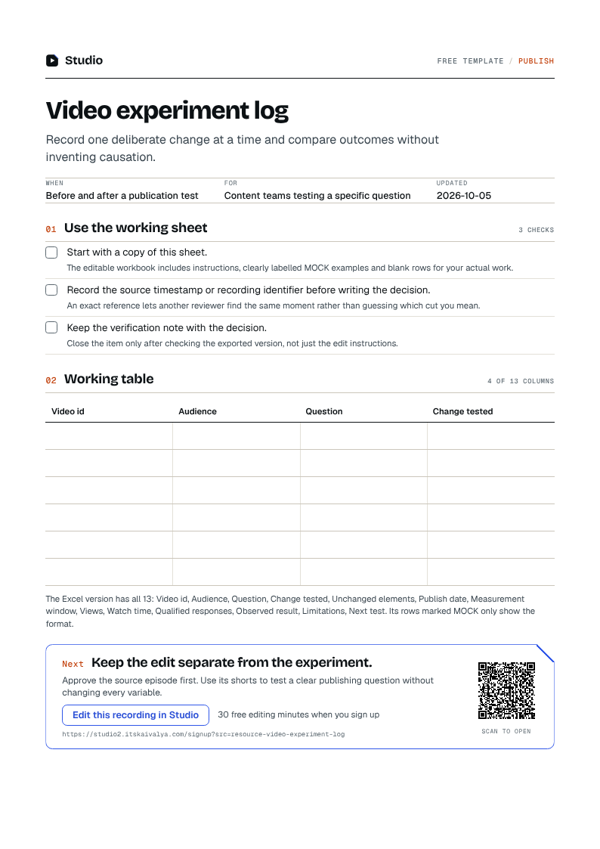
Record one deliberate change at a time and compare outcomes without inventing causation.
- WhenBefore and after a publication test
- ForContent teams testing a specific question
- Inside13 columns
PDF, A4, 1 page · No email needed
00:10What's inside
13 columns, ready to fill in.
Fill it in on the Excel version, or print the PDF. The example rows show the format.
| Video id | Audience | Question | Change tested | Unchanged elements | Publish date | Measurement window | Views | Watch time | Qualified responses | Observed result | Limitations | Next test |
|---|---|---|---|---|---|---|---|---|---|---|---|---|
| ExampleVideo A | New podcast listeners | Does a concrete opening help? | Opening title wording | Source clip and publication window | Matched windows | Not measured | Audience may differ | Review when results exist | ||||
| ExampleVideo B | Returning listeners | Does the thumbnail explain the task? | Thumbnail wording | Reviewed video and description | Matched windows | Not measured | Publication timing may affect results | Record observed data | ||||
| ExampleVideo C | Tutorial viewers | Does a step label improve clarity? | Step label | Source demonstration | Matched windows | Not measured | Small audiences limit conclusions | Keep other settings stable | ||||
Swipe the table sideways to see every column.
How to use it
- Start with a copy of this sheet.The editable workbook includes instructions, clearly labelled examples and blank rows for your actual work.
- Record the source timestamp or recording identifier before writing the decision.An exact reference lets another reviewer find the same moment rather than guessing which cut you mean.
- Keep the verification note with the decision.Close the item only after checking the exported version, not just the edit instructions.
00:20Next on your list
See all templates
More free templates.
-
12 checks · 6 fields
Video publishing checklist
Review the export, captions, thumbnail and destination before you publish. -
10 checks
YouTube description outline
Write a description that explains the actual recording and links only to verified destinations. -
22 fields
Video editing brief
Give an editor the audience, point, source files, delivery format and review constraints.
00:30Your next step
Start with your recording
Edit this recording in Studio
30 free minutes · No card
Keep the edit separate from the experiment.
Approve the source episode first. Use its shorts to test a clear publishing question without changing every variable.
Free tool for this step: Content repurposing planner